
|

|


|
|
|
|
|
Klondike is a one-deck simple closed packer-builder solitaire game:
One-deck because it is played with a standard 52-card French deck, sometimes also known as the "International", "Poker" or "Bridge" cards.
Simple because it begins with all cards either distributed into one of the seven piles on the tableau or left in the remaining stock, without any cards held in reserve (there is no reserve in Klondike).
Closed means that at the beginning of the game there are cards turned face-down, so the player has incomplete (imperfect) information.
Packer means that cards can temporarily be arranged in contiguous descending order, King to Ace, on the tableau (this is called packing). In Klondike, besides being in contiguous descending order, packed cards must alternate colors.
Builder means that the end goal of the game is to arrange all cards in four piles in ascending order, Ace to King, by suit (this is called building, and the piles above the tableau where the cards are ordered in contiguous ascending order by suit are called foundations).
Solitaire (synon. patience) game means it is a single-player game, i.e., one player (or a confederacy of allies playing as one) against the cards.
In Outplay us! Klondike, moving a card is as simple as first tapping the card you want to move, then tapping the place where you want to move it. For instance:
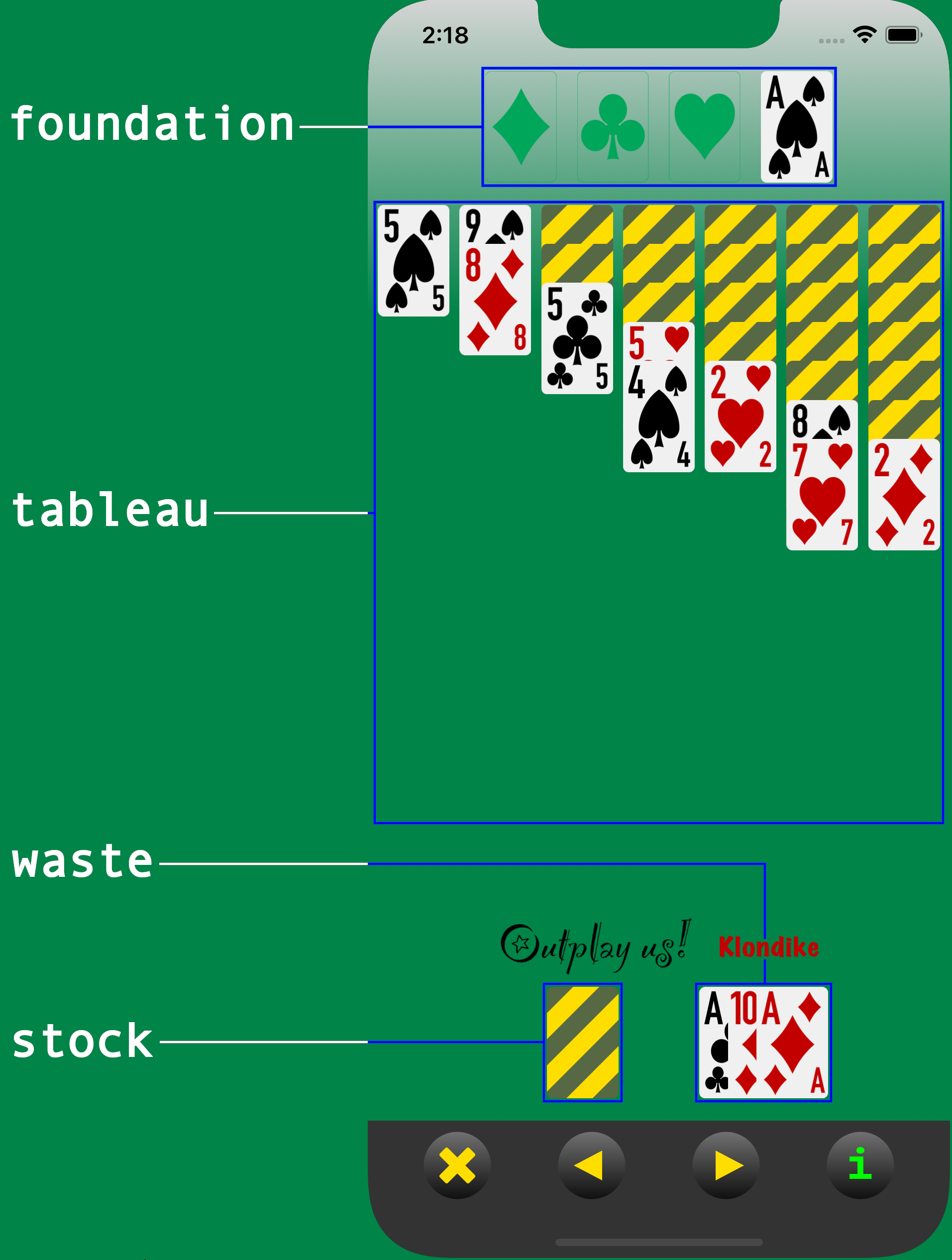
To move the Ace of diamonds from the top of the waste pile to the foundation, tap the Ace and then the foundation. Actually, you can tap anywhere on the waste pile and only the top card (i.e., the Ace of diamonds) will be selected; similarly you can tap anywhere on the foundation, and the Ace of diamonds will jump to its correct location on the diamond pile.
After moving the Ace of diamonds to the foundation, it is possible to move the two of diamonds to the foundation as well. To do so, you can simply tap the two of diamonds and then tap its destination on top of the Ace of diamonds, and it will perform the requested jump; but just as before, it is enough with tapping anywhere on the column containing the 2 of diamonds (the seventh column), and then anywhere on the foundation, and the 2 of diamonds will jump to its correct location on the diamond pile.
Similarly you can use the tap-tap method to move cards from the waste pile to the tableau, between columns in the tableau, and even from the foundation back to the tableau (but not back to the waste pile or the stock).
To turn over the next card or cards from the stock onto the waste pile, just tap
the stock pile itself; at any given time only the top card of the waste pile is
available for moving to either the tableau or the foundation. When you run out of
cards in the stock pile, tapping on the empty stock icon (e.g.,

when playing with infinite restocks) will replenish the stock pile with all the
cards from the waste, which will then be re-dealt in the same order.
When a column in the tableau becomes empty because all its cards have been moved to another column or to the foundation, it can be filled again by moving to it either a King or a pile of cards starting with a King.
In devices with little vertical space it is possible for cards in the tableau to extend so far down that they will be placed outside of the viewable area; this is, of course, unfortunate, but not an error or a problem: the app will keep track correctly of both the cards and your taps.
As for the buttons on the game control bar, these are their functions:

|

|
|
Abort the current hand. |
|
|

|
|
Undo last move. |
|
|

|
|
Redo last undone move. |
|
|

|
|
About Outplay us! Klondike. (This button can be tapped at any time without disrupting the current hand.) |
|
|

|
|
Start a new hand. (This button is only available after a hand terminates either by aborting or by winning.) |
|
|

|
|
Open the settings panel. (This button is only available at the beginning of a hand, before any moves have been made.) |
Through the settings panel, you have access to the following options:
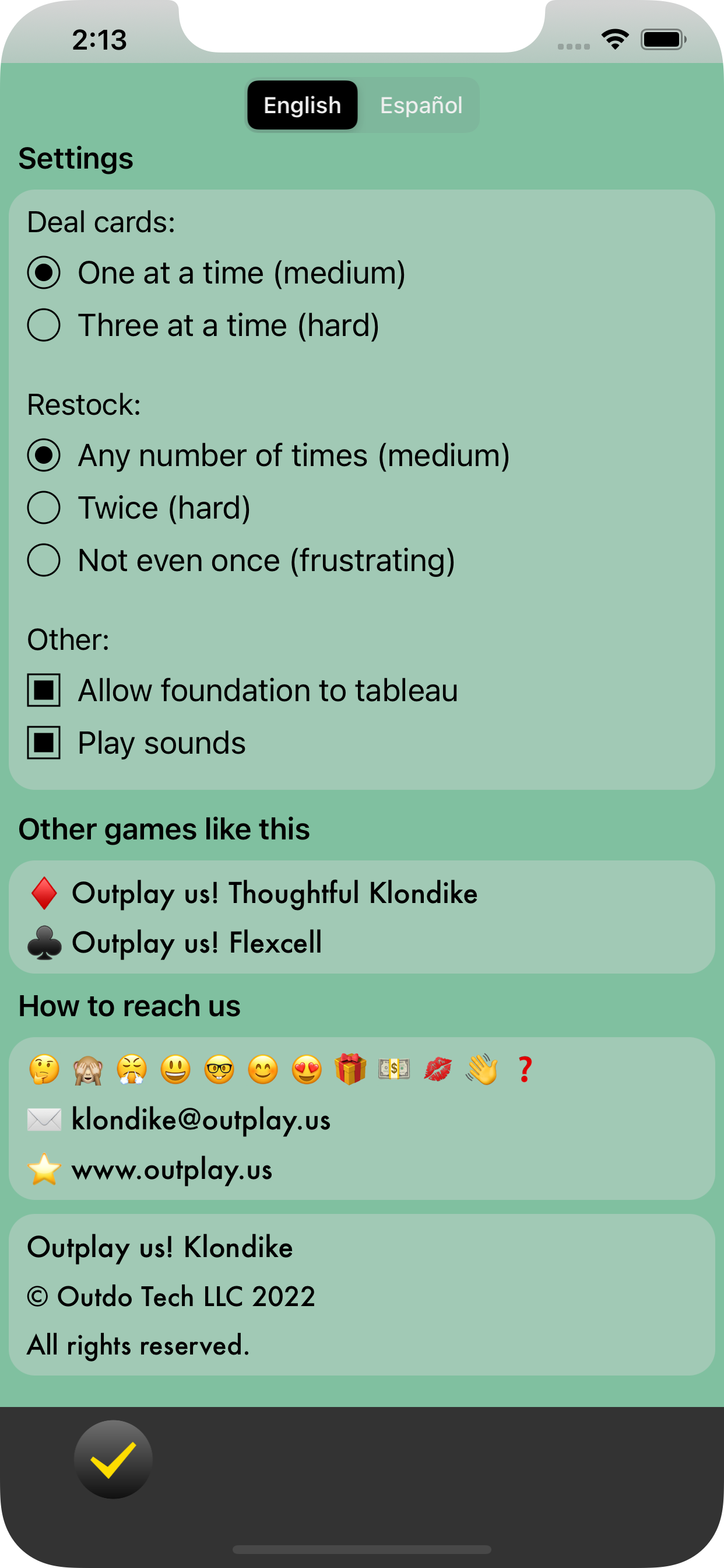
Deal cards, either one-by-one or three-by-three. The former mode has a much higher probability of being solvable than the latter: one-by-one is more skill-based (and therefore more interesting, in our humble opinion), while in three-by-three luck plays a larger role.
Restock, either any number of times, two times (for a total of three passes through the stock) or zero times (so, a single pass through the stock). Again, the first mode is more skill based; the second is very luck-dependant but challenges you to remember the cards in the stock and their order, which might serve you as practice for other card games in which that is a critical skill; and the third is almost pure luck, with very little room for skill, but it's the only mode described in some sources so we include it in the app for completeness.
Allow foundation to tableau. Basically no sources mention the possibility of returning a card from the foundation back to the tableau, which is a very convenient and perhaps even necesary move in some hands, but in practice it's commonly implemented in computer versions of Klondike. We include it as an option here so you can enable or disable it according to how you feel about it being (or not) a valid rule in "proper" Klondike.
Play sounds. All the sounds (clicks, chimes, etc.) from the interface can be muted by disabling this option.