
|

|


|
|
|
|
|
Thoughtful Klondike is exactly like Klondike, with one unique and crucial difference: in Thoughtful, you know the location of every card from the very beginning of the game, both in the tableau and in the stock. If you imagine that you're playing regular Klondike, but you have X-ray vision to easily see even the cards that are closed, that game you are imagining is precisely Thoughtful Klondike.
"If they are so similar, what is the point of Thoughtful Klondike?", you might be asking. The answer is very simple: to reduce to role of luck, and increase the importance of skill, in the result of the game. In Thoughtful Klondike you can (at least in principle) calculate precisely the consequences of all your decisions, so in those (very common) cases where you have several possible moves you can accurately evaluate what is the best choice (in regular Klondike, not having all the information quite often turns a decision into a matter of luck). Not only that: if the game is unsolvable (and that might be the case in about 20% of the hands), you can conclude so far in advance of reaching an obvious dead end. All of this makes Thoughtful Klondike a true thinking challenge, in some regards closer in feeling to games such as Freecell rather than to good ol' Klondike.
In Outplay us! Thoughtful Klondike, moving a card is as simple as first tapping the card you want to move, then tapping the place where you want to move it. For instance:
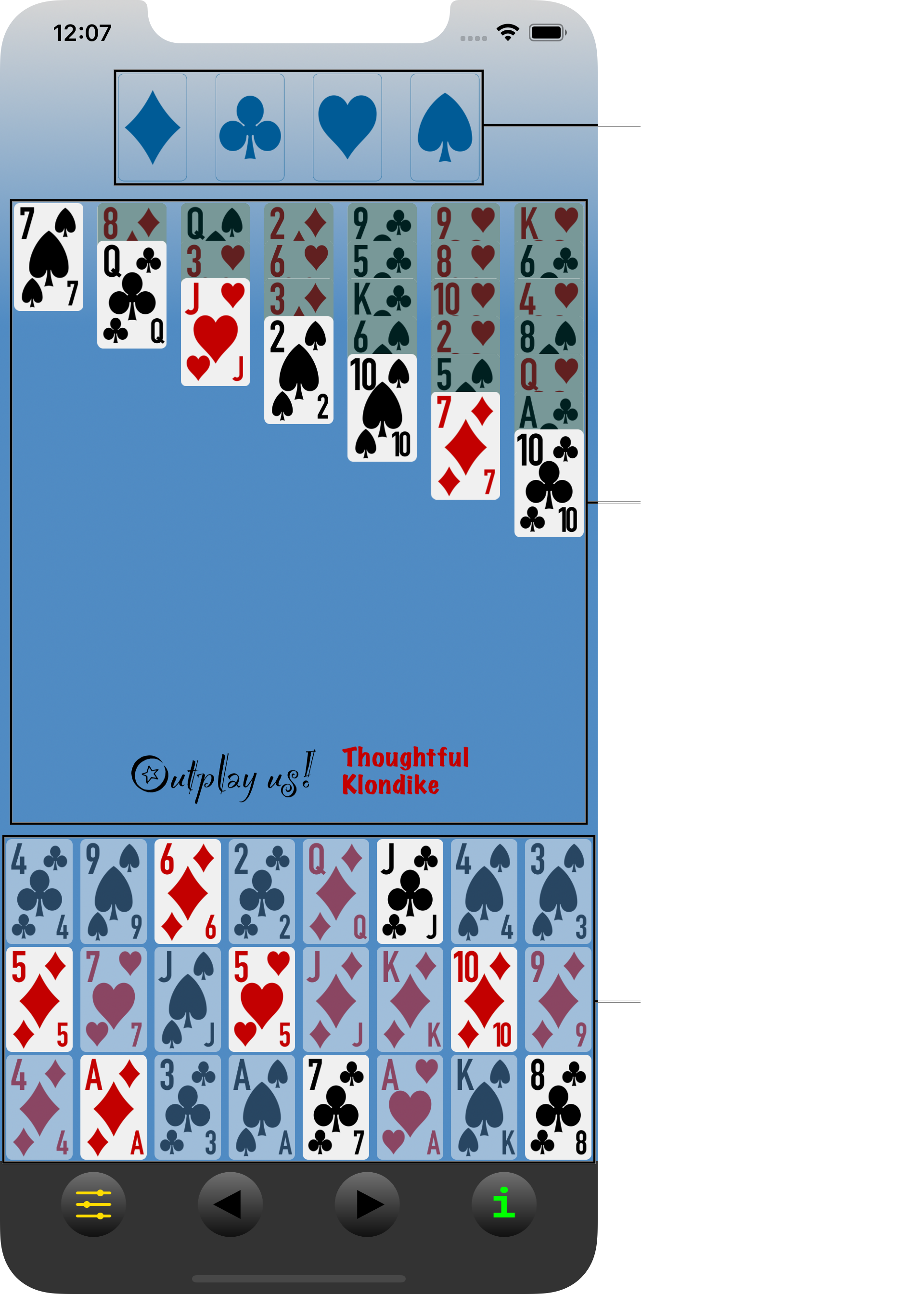
(It's important to notice that the "Outplay us!" sign lies completely inside the tableau. This fact will be used below as a guideline to facilitate interaction with the app.)
To move the Jack of hearts from the third column in the tableau on top of the Queen of clubs in the second column, just tap first the Jack and then the Queen. Actually, you can tap anywhere on the third column, even above or below the Jack, and the Jack (and only the Jack) will be selected; similarly you can tap anywhere on the second column, even above or below the Queen, and the Jack of Hearts will jump to its correct location on the second column.
To move the six of diamonds from the stock to the first column of the tableau, tap the six and then the column. Please notice that in this case you do need to touch specifically the card you want to move, i.e., the six of diamonds, since the stock has several cards (6 of diamonds, Jack of clubs, 5 of diamonds, etc.) that could be played (in this example, the 3-by-3 mode has been selected, which is why only 1 in 3 cards is immediately available for play).
Similarly you can use the tap-tap method to move cards from the stock to the foundation, and even from the foundation to the tableau (but not to the stock.)
As in regular Klondike, when a column in the tableau becomes empty because all its cards have been moved to another column or to the foundation, it can be filled again by moving to it either a King or a pile of cards starting with a King.
The management of the stock can appear tricky at first sight, so here's a more detailed example. This is one of those concepts that takes long to explain but is easy to grasp, however, so make sure not to get lost in the details. Consider this hand:
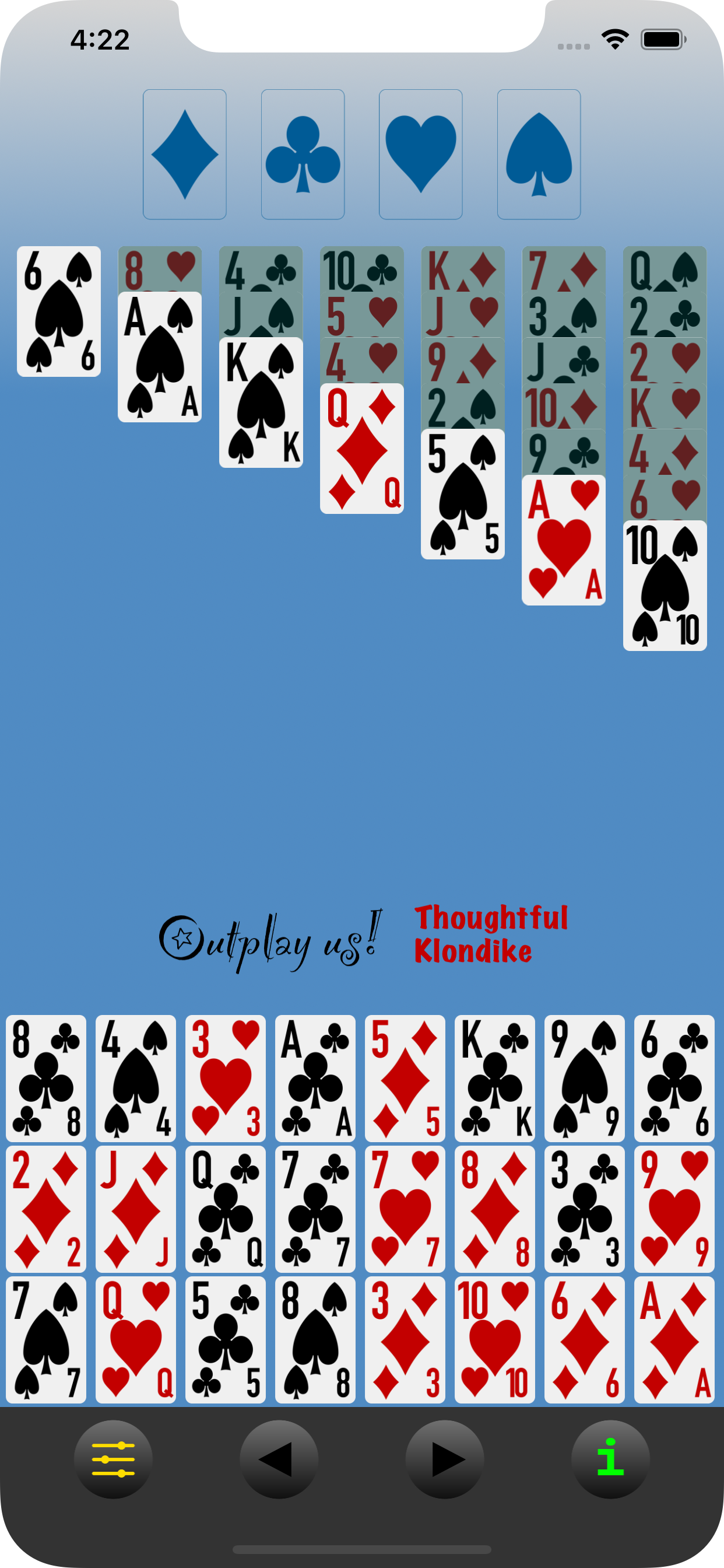
As you can see, all cards in the stock are highlighted, which means the player has selected the 1-by-1 mode. The top of the stock is at the top left, in this case the 8 of clubs; the second card is the one to its right, i.e., the 4 of spades, then the 3 of hearts, etc. When getting to the end of the line, the next card is the leftmost of the following line, so the 2 of diamonds follows the 6 of clubs, and the 7 of spades is after the 9 of hearts. In this manner, you can "read" the stock as if "reading" a normal text in English.
If you notice, the fourth card in the stock is the Ace of clubs; this card can be moved directly to the foundation by first tapping it and then tapping anywhere in the foundation; the Ace will jump to its right location. But what should happen to the cards that remain in the stock?
Well, in regular Klondike you would have to go over the cards in the stock 1-by-1, turning over first the 8 of clubs, then the 4 of spades, then the 3 of hearts and then arriving to the Ace of clubs. You would move the Ace of clubs to the foundation, and the card you turned over right before that Ace, i.e., the 3 of hearts, would then be available for play. However, the cards below that, i.e., the four of spades and the eight of clubs, would be covered by the 3 of hearts and therefore unavailable for play. As for the remaining cards, those after the Ace of clubs (so, five of diamonds, King of clubs, etc.) would not change at all with regards to their availability. This is represented in the following screenshot:
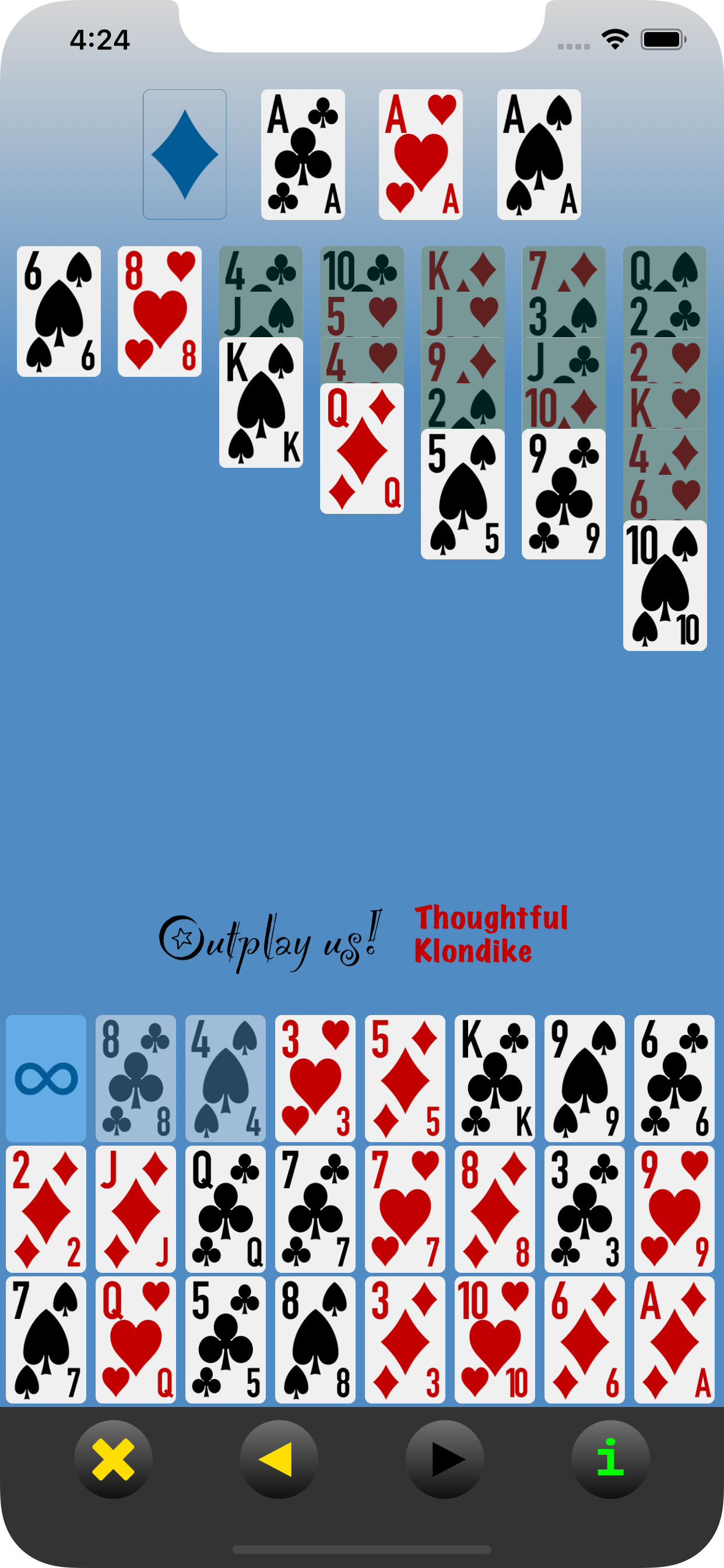
As you can see, the 8 of clubs and the 4 of spades are indeed unavailable (grayed out),
the first available card is the 3 of hearts and the remaining cards are unaltered. In
addition, the "redeal" button,

has appeared at the top of the stock: if at any point you
want to go again over the entire remaining stock, tapping this button will make all
cards available again. In this example, the button indicates unlimited redeals, so you
can go over the stock as many times as you want; depending on the game mode selected,
however, this number might be restricted to only 2 redeals or even no redeals. Finally,
notice also how the Aces of hearts and spades have automatically jumped from the tableau
to their corresponding locations on the foundation.
In devices with little vertical space it is possible for cards in the tableau to extend so far down that they will apear mixed with cards in the stock; this is, of course, unfortunate, but not an error or a problem: the app will keep track correctly of both the cards and your taps. Consider the next example captured from an iPod Touch:
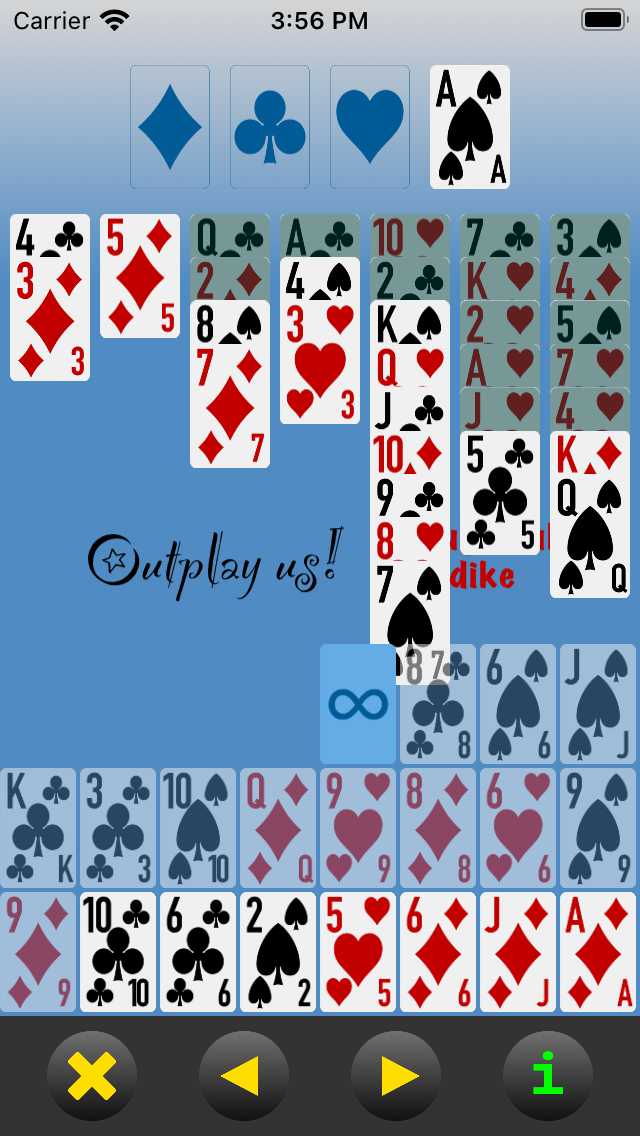
The 7 of spades in the fifth column of the tableau partially overlaps with the 8 of clubs at the top of the stock and with the redeal button. However, it is still possible to move the 6 of diamonds (third to last in the stock) below the 7 of spades by simply tapping on the 6 and then anywhere in the fifth column of the tableau (say, on the 8 of hearts, the King of spades or even the 10 of hearts):
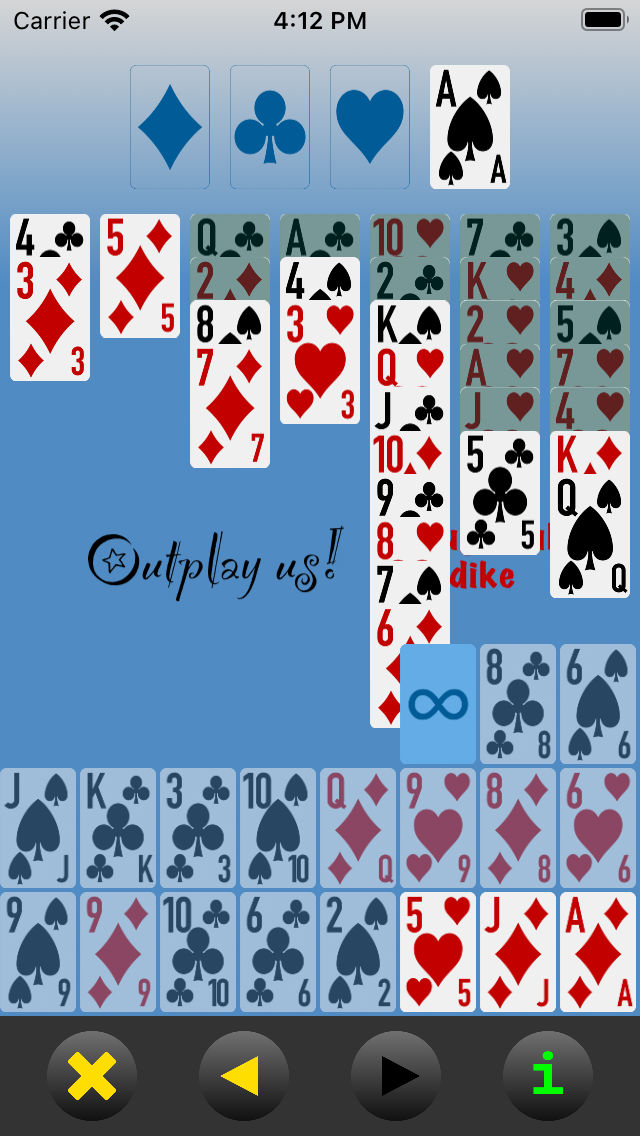
You can use the "Outplay us!" sign as a guideline for your tapping: to tap on the tableau, touch at the level of the sign or above; to tap on the stock, make sure to touch below the sign. So, to move the 5 of clubs below the 6 of diamonds, touch first the sixth column of the tableau (so, at the 5 of clubs itself, or at the Jack of hearts, Ace of hearts, etc.) and then the fifth column of the tableau (that is, at-or-above the "outplay us!" sign: 7 of spades, 8 of hearts, 9 of clubs, etc.). If instead you tried to touch the 6 of diamonds, you would be tapping on the stock and since the closest thing is the redeal button you would probably trigger a redeal rather than a card move. This is how the screen might look a couple of moves later if successfully moving the 5 of clubs:
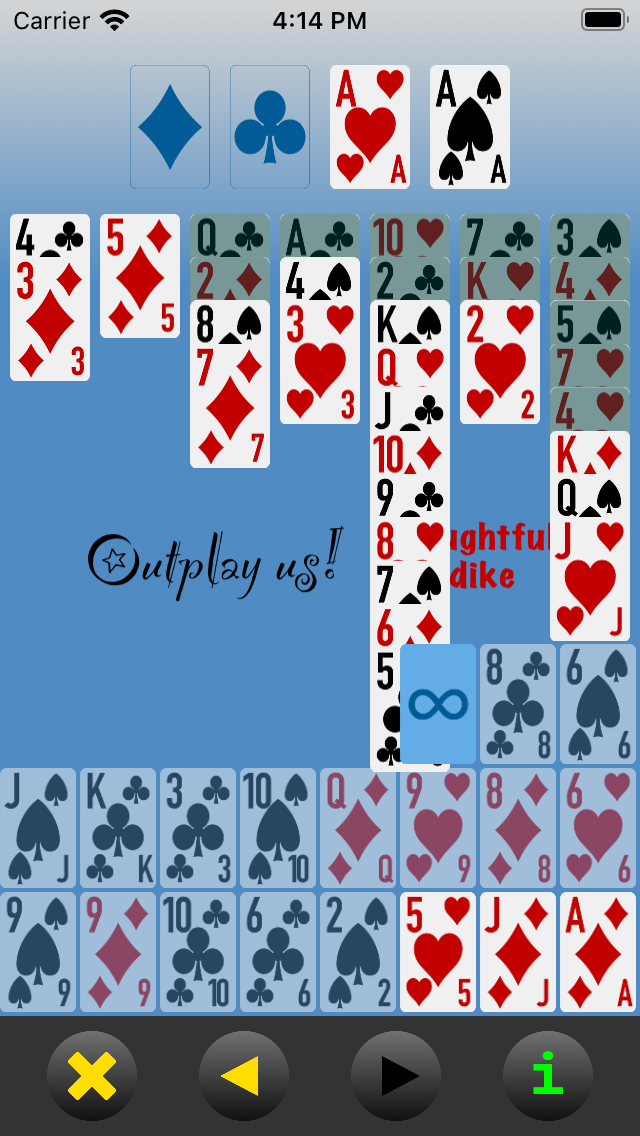
As the cards in the stock are used, more space is cleared and the visual conflict lessens. Keep in mind, however, that touching below the "Outplay us!" usually means "stock", while touching above it always means "tableau".
As for the buttons on the game control bar, these are their functions:

|

|
|
Abort the current hand. |
|
|

|
|
Undo last move. |
|
|

|
|
Redo last undone move. |
|
|

|
|
About Outplay us! Klondike. (This button can be tapped at any time without disrupting the current hand.) |
|
|

|
|
Start a new hand. (This button is only available after a hand terminates either by aborting or by winning.) |
|
|

|
|
Open the settings panel. (This button is only available at the beginning of a hand, before any moves have been made.) |
Through the settings panel, you have access to the following options:
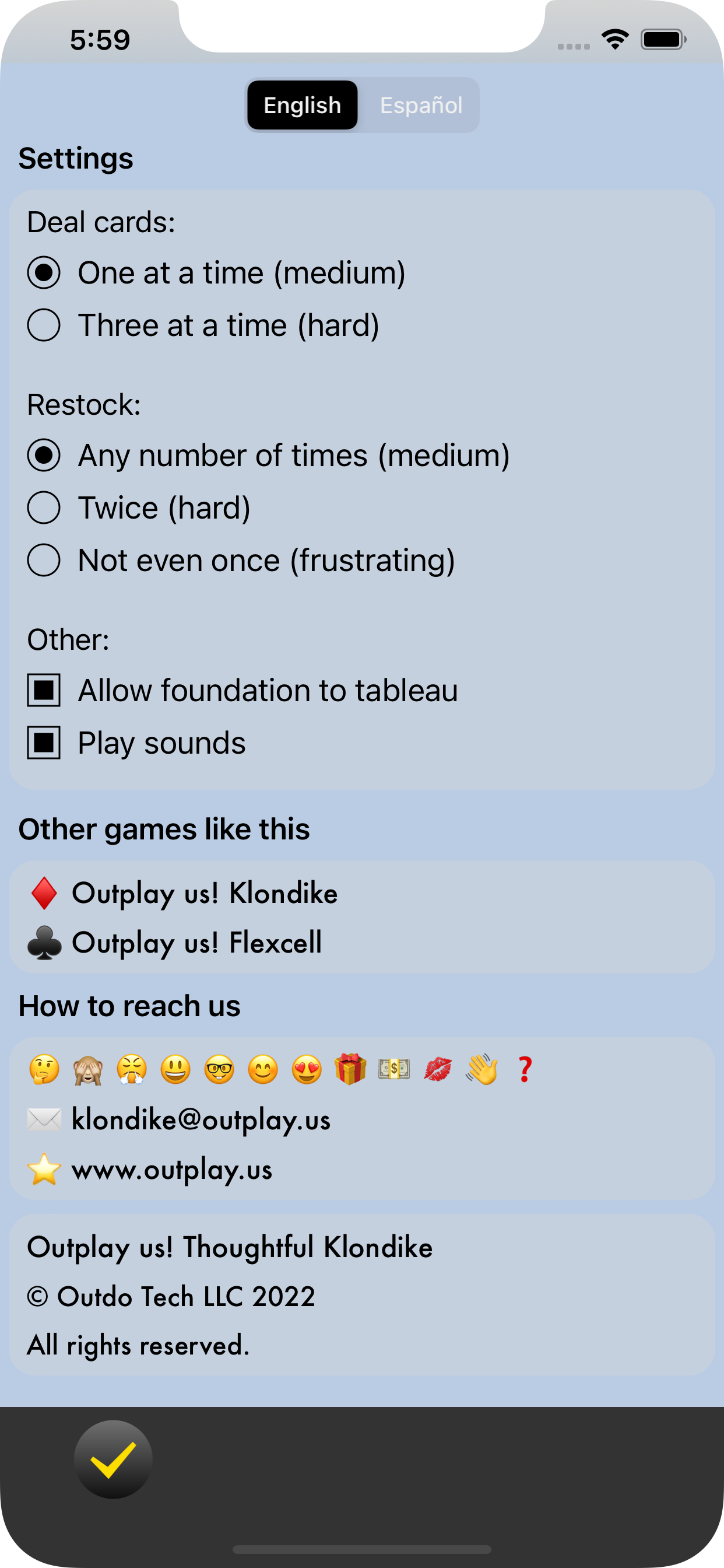
Deal cards, either one-by-one or three-by-three. The former mode has a much higher probability of being solvable than the latter: one-by-one is more skill-based (and therefore more interesting, in our humble opinion), while in three-by-three luck plays a larger role.
Restock, either any number of times, two times (for a total of three passes through the stock) or zero times (so, a single pass through the stock). Again, the first mode is more skill based; the second is very luck-dependant but challenges you to remember the cards in the stock and their order, which might serve you as practice for other card games in which that is a critical skill; and the third is almost pure luck, with very little room for skill, but it's the only mode described in some sources so we include it in the app for completeness.
Allow foundation to tableau. Basically no sources mention the possibility of returning a card from the foundation back to the tableau, which is a very convenient and perhaps even necesary move in some hands, but in practice it's commonly implemented in computer versions of Klondike. We include it as an option here so you can enable or disable it according to how you feel about it being (or not) a valid rule in "proper" Klondike.
Play sounds. All the sounds (clicks, chimes, etc.) from the interface can be muted by disabling this option.